

1. Eligibility & How to Apply
The Dexari Affiliate Program is application-based. Approval for the program is at Dexari’s sole discretion.- How to apply: Fill out the application form located here.
- Qualifications: You must already hold referral status on Dexari with an established track record, or be an influencer with an established audience size.
- What happens after approval: Your standard referral code will automatically upgrade to an affiliate code. This increases your revenue share ratio and points rewards. New users simply enter your code during onboarding to link to your account.
2. Commission Rates & Tier System
The program uses a three-tier structure. Your tier is determined by the monthly trading volume generated by your directly referred users. Volume thresholds are assessed automatically on a monthly basis, and exact targets are actively adjusted based on market activities. Higher volume unlocks a higher direct revenue share, up to 70%.
Indirect Referrals (Sub-affiliates): When a user you directly invited also refers others, you earn an additional 33% commission on the trading fees generated by those sub-referrals (bringing your total potential revenue share up to 80%).
Tier Maintenance & Grace Periods
Your tier is determined by the monthly trading volume generated by your directly referred users. Note: Affiliate tiers are based solely on referral volume. Other benefits, such as badge eligibility, may consider additional factors like personal trading activity.- 1st Month Below Threshold: You remain in your current tier, protected by a grace period.
- 2nd Consecutive Month Below Threshold: You are downgraded one tier.
- Consecutive Months at Lowest Tier: If you fail to meet requirements at the lowest tier, your affiliate status is revoked, and you revert to the base referral commission rate.
Affiliate Badge Eligibility (X / Twitter)
Affiliates may qualify for an official Dexari Affiliate badge for use on X (Twitter), signaling verified participation and scale within the Dexari ecosystem. Minimum requirement- $25,000,000 USD in monthly trading volume attributed to the affiliate.
- Eligible volume includes:
- Trading volume generated by your direct referrals
- Trading volume generated by your own trading activity on Dexari
- Dexari values affiliates who are both builders and users.
- Trading on Dexari yourself strengthens credibility and alignment with the product.
3. Managing Codes & Referee Discounts
You can access the Affiliate Program dashboard from the “Me” section in the Dexari app. The dashboard features three main tabs: Performance, Codes, and Sub-affiliates.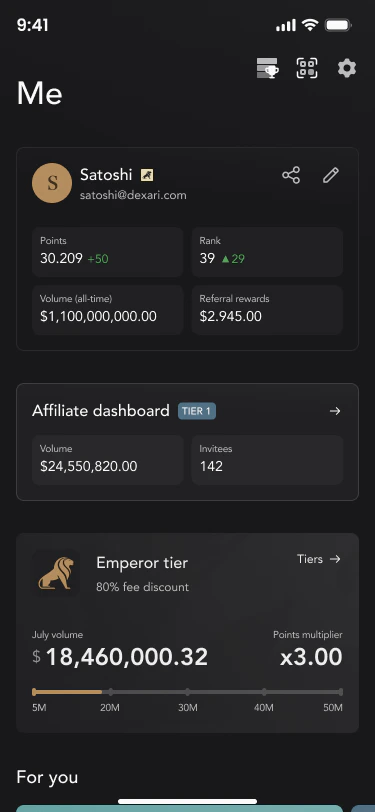
Managing Your Affiliate Codes
Navigate to the Codes tab to manage your affiliate links. Here, you can:.png?fit=max&auto=format&n=bfYyID1LZILtuONM&q=85&s=aa32108beb3f7af66ed556ba48f5a415)
- Create Code: Generate a new code with a custom name for different audience groups.
- Edit Code: Modify an existing code by changing its display name for you or your audience.
- Delete Code: Permanently remove a code. > Note: If you delete a code, referees under that code will no longer be credited to you.
Setting Discounts for Your Referees
You have the flexibility to give back up to 100% of your earnings as a fee discount for your referees.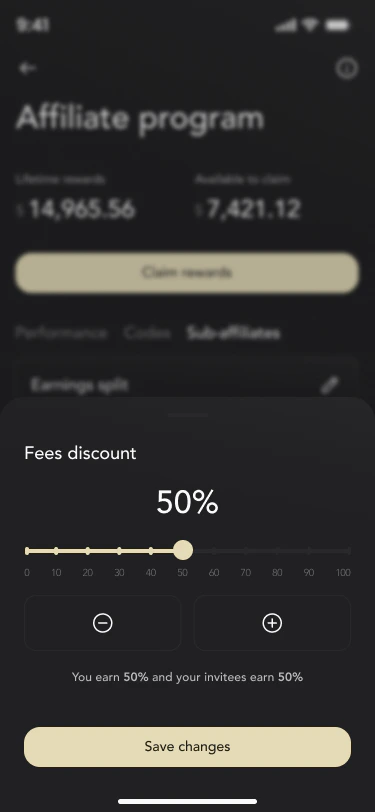
- Navigate to the Sub-affiliates tab.
- Click on the ‘pen’ icon to adjust the fee discount.
- Regardless of whether you choose revenue share or a 100% discount, you will still earn 25% of the points from your referees’ trading activities.
4. How to Claim Rewards
Your commission earnings are displayed as Lifetime rewards (cumulative earnings) and Available to claim (current balance ready for withdrawal). Rewards are calculated in real-time.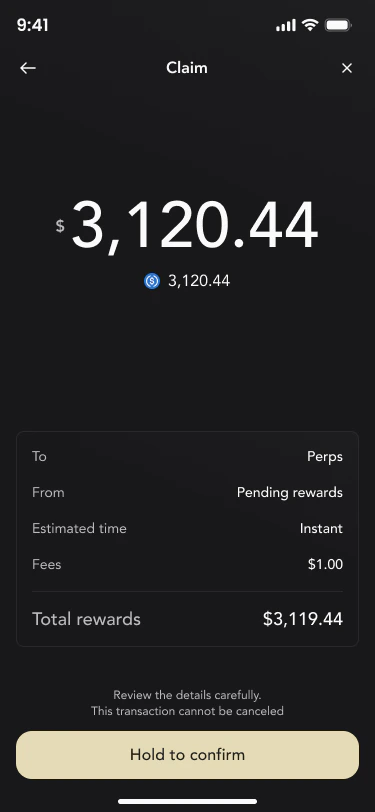
- Minimum Claim: $10 USDC.
- Currency: USDC.
- Destination: Your Dexari trading account.
- Initiate Claim: From the main dashboard, tap the gold “Claim rewards” button to open the claim review screen.
- Review Breakdown: Carefully review the details, which show your account info, fee details, and the total amount to be claimed.
- Authenticate: Tap confirm and authenticate via Passkey to secure the transaction.
- Processing: A “Claiming rewards…” screen with a loading indicator will appear. Do not close the app during this step.
- Confirmation: A “Rewards claimed” screen will confirm the transaction was successful. Tap anywhere to return to the dashboard.